
Adding Text Series Subscribers and Handling Opt-Outs
Overview
People who receive a Text Series are called subscribers. Every subscriber must agree to receive your texts, and anyone can stop them at any time by texting STOP. This article explains each way people join, what each subscriber status means, and what happens when someone opts out.
Before You Start
- The series must be Active before you add anyone. See Getting Started with Text Series.
- Only Admins can add subscribers, record consent, or delete a subscriber.
- Your practice is responsible for having permission to text every number you add. This article explains how Social Cascade records consent; it isn't legal advice.
Ways People Join a Series
| How they join | What happens | Confirmation step |
|---|---|---|
| They text your Keyword to your number | They're enrolled right away and get your welcome message | None. Texting the keyword is the request. |
| They sign up on a landing page or by scanning your QR code | They tick a consent box, then get a text asking them to reply YES | Reply YES within 48 hours |
| You add them on the Single or Bulk Import tab | They get a text asking them to reply YES | Reply YES |
| You add them on the In-Person / Prior Consent tab | They're enrolled right away, with no confirmation text | None. You attest to the consent you already hold. |
The landing-page consent box reads: "I agree to receive recurring … text messages from [your practice]. Message frequency varies. Msg & data rates may apply. Reply STOP to cancel, HELP for help."
The confirmation text reads: "Reply YES to confirm you want to receive [series] from [your practice]. Msg frequency varies. Msg&Data rates may apply. Reply STOP to cancel, HELP for help."
Your welcome message always includes the opt-out and data-rates wording. No other series message is sent until the welcome message has gone out.
How to Add Subscribers Yourself
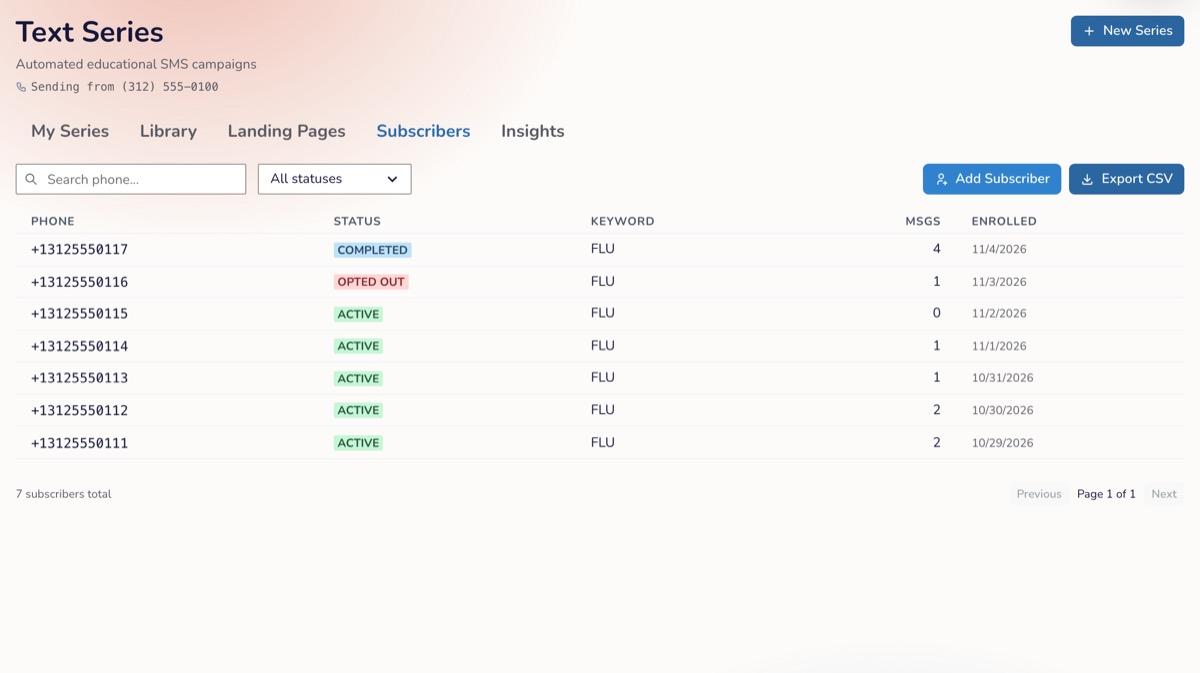
- Click Text Series in the main menu, then the Subscribers tab.
- Choose the series from Series:.
- Click Add Subscriber. The Add Subscribers window opens.
- Choose a tab:
- Single: enter one phone number.
- Bulk Import: upload a CSV or .txt file of US phone numbers (up to 100 KB and 500 rows).
- In-Person / Prior Consent: use this only when you already hold consent, such as a signed paper form or a consent checkbox on your own website. Choose how consent was given (Paper form, Web form (their own site), Verbal, at a visit/appointment, Existing relationship or Other), the date, and an optional note on where the record is filed. Verbal consent and an existing relationship aren't written consent. If you're not sure they're enough for this series, use Single instead so the person confirms by text.
- Tick the confirmation statement. On Single and Bulk Import it reads "I confirm we have a lawful basis to text these numbers about this series, and they are not on our do-not-contact list." On In-Person / Prior Consent, the statement matches the consent method you chose, and you also confirm you'll keep the consent record for at least 7 years.
- Click Send Confirmation SMS (Single and Bulk Import) or Enroll Immediately (In-Person / Prior Consent).
Keep your own consent records, such as signed forms or notes of when and how consent was given, for at least 7 years. Social Cascade keeps its record of each enrollment for 7 years, but it can't replace the original document.
Subscriber Statuses
| Status | Meaning |
|---|---|
| Pending | Waiting for the person to reply YES |
| Active | Receiving the series |
| Paused | Messages are on hold for this person |
| Completed | They've received every message in the series |
| Opted out | They texted STOP, didn't confirm in time, or were opted out another way. They get no more messages. |
Open a subscriber to see their details and history. From there an Admin can Resend opt-in text (Pending only), Record prior consent or Record new consent, Pause subscriber or Resume subscriber, and Delete subscriber (GDPR). Click Export CSV on the list to download it.
Landing-page sign-ups that aren't confirmed within 48 hours change to Opted out. If the person later replies YES, they're sent a new confirmation text.
Reply Keywords
Replies are matched without regard to capital letters or trailing punctuation.
| They text | What happens |
|---|---|
| STOP, STOPALL, UNSUBSCRIBE, CANCEL, END or QUIT | They're opted out of every series they're in from your practice right away, and any messages waiting to send are cancelled |
| HELP or INFO | They get your series' HELP response. Include your practice name and a phone number or email in it. |
| START, YES or UNSTOP | Confirms a pending sign-up, or re-subscribes someone who opted out |
When Someone Opts Out
- You can't add an opted-out number back on the Single or Bulk Import tab, and you can't text them to ask. The message is "This contact is opted out. They have to text START themselves to resubscribe — we cannot text them to ask."
- Texting your keyword again doesn't re-enroll them either. They need to text START.
- If someone who texted STOP later gives you new consent in person, you can click Record new consent on their record. Their messages still won't arrive until they text START themselves, because the phone network keeps blocking the number until then.
Troubleshooting
| Issue | Cause | Fix |
|---|---|---|
| "This series must be active before adding subscribers." | The series is a Draft or Paused | Launch or resume the series first |
| "Only admins can add subscribers." | You're an Editor or Viewer | Ask a team Admin |
| "This contact is opted out. They have to text START themselves to resubscribe — we cannot text them to ask." | The person opted out | Ask them to text START to your number |
| "Series subscriber cap reached." | Your texting plan's subscriber limit is reached | Remove inactive subscribers or upgrade your texting plan in Account Settings → Billing |
| "No valid US phone numbers found in the file." | The file has no recognizable US numbers | Put one number per row and export again as CSV |
| "This contact has already been asked several times recently." | Too many confirmation texts sent to this number | Wait before resending |
| A subscriber stays Pending | They haven't replied YES | Click Resend opt-in text, or ask them to reply YES |
FAQ
Q: Why does adding someone myself send them a confirmation text? A: The Single and Bulk Import tabs require the person to confirm with YES, so their own reply is the record of consent. If you already hold written consent, use In-Person / Prior Consent instead.
Q: Does STOP on one series stop all of them? A: Yes. STOP ends every series that person is in with your practice.
Q: What should I never text? A: Patient names beyond merge fields, diagnoses, medications, test results, or anything tied to a specific patient's care.